Access log
The access log is one record of every change to who can do what in an organization: sharing, general access, teams, roles, member permissions, who can approve runs and API keys. Use it to answer "when did she get access to that connection, and who gave it?" or to review key activity for an audit.
This feature is currently rolling out and may not be enabled for your organization. See Access control overview.
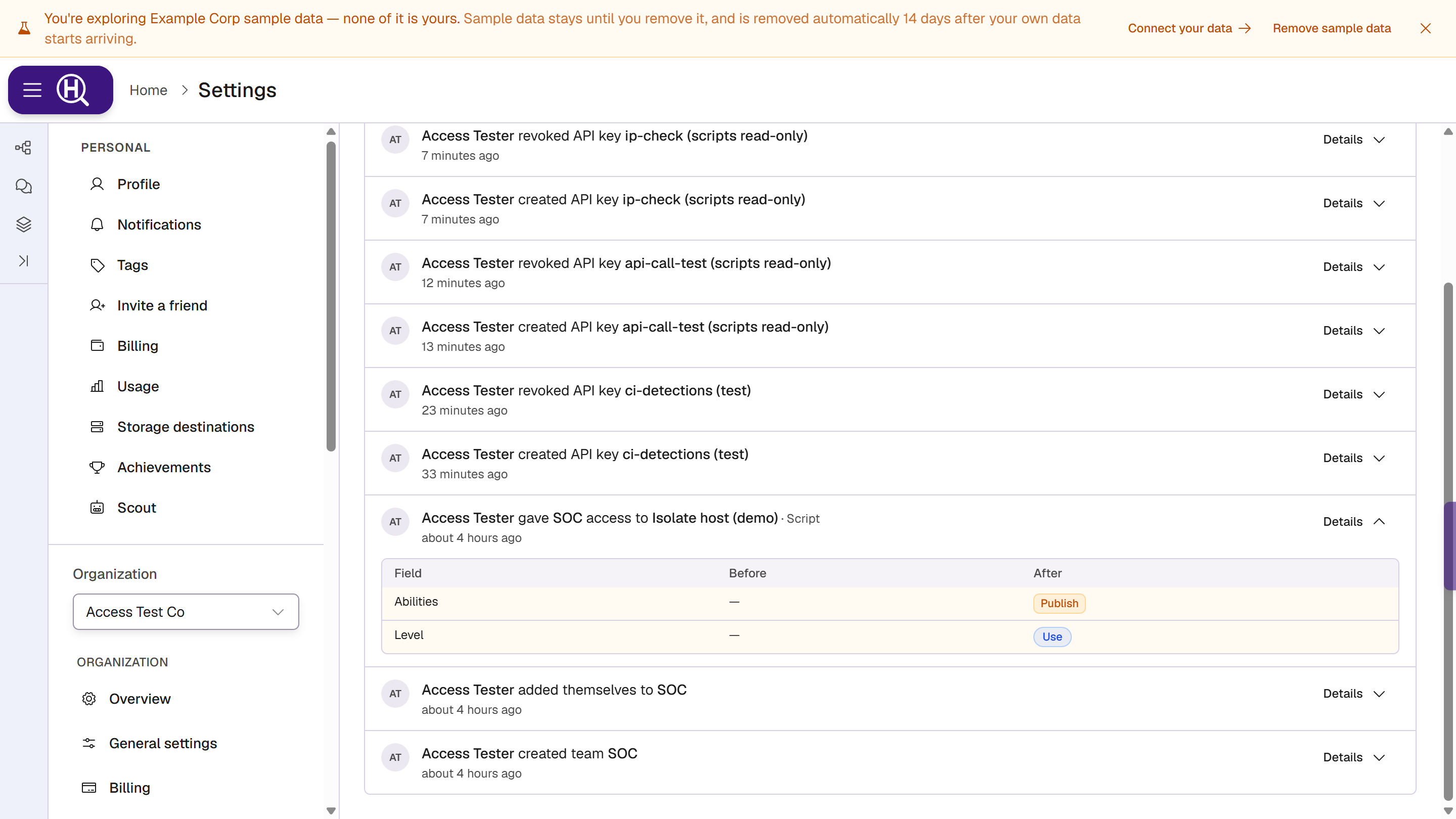
Open the access log
Go to Settings › [Organization] › Access log, under People & access. It is for organization admins and owners, and for members who have been given permission to manage members. Anyone else sees Only org admins and people who manage members can read the access log.
The organization's Audit log keeps its own, broader history of changes to the organization. The access log covers access only, with what changed before and after.
Read a row
Each row reads as a sentence: who, what they did, to what, and for whom, with when it happened on the line below.
Dana Lee changed access to Isolate endpoint · Action for Priya Nair
- Who is a person, or an API key marked (API key) when the change was made with one. Changes made by Huntbase support show as Huntbase staff.
- For whom is the person, team or key whose access changed, when there is one.
- Hover the time to see the exact date and time.
Click Details to expand a row. A Before / After table lists each field that changed first, then the ones that didn't. A new item has only After; a removed one only Before.
What is recorded
| Change | Reads as |
|---|---|
| A person, team or key's access to an item | changed access to |
| An item's general access | changed general access to |
| A connection restricted or opened to everyone | restricted access to / opened access to |
| Teams created, renamed or deleted | created team, updated team, deleted team |
| Team members added, changed or removed | added someone to, changed a member of, removed someone from |
| Members invited, removed, or given a new role | invited, removed, changed the role of |
| Member permission overrides | changed permissions of |
| Custom roles created, changed or deleted | created role, changed role, deleted role |
| A team's access across the org | changed team access of |
| Overrides turned into a team | moved overrides to a team for |
| Who can approve runs | changed who can approve runs in |
| API keys created, changed, rotated or revoked | created API key, updated API key, rotated API key, revoked API key |
Changes made through the older Access screens are recorded too: the Access tabs on Actions and scripts, query sharing, and a hunt's people and visibility.
Filter the log
| Filter | Options |
|---|---|
| Actor | Anyone, Any API key, or one person. |
| Resource | Any resource, or a kind: Action, Script, Connection, Endpoint tag, Hunt, Query, Team, API key or Member. |
| Action | Any action, or a group: Sharing changes, Role changes, Member changes, Role definitions, Team access, Override migration, Approvals setting, Team changes, Team membership, API key changes, or one key event (API key created, API key rotated, API key revoked). A group matches every change in it. |
| From / To | A date range in your local time. Both days are included. |
Filters are kept in the page's URL, so you can bookmark or share a filtered view. Clear filters resets them. The log loads the newest changes first; click Load more for older ones.
Links from other screens open the log already filtered to one item. Changes to this key on an API key is one. The filter then shows One API key with the key's ID; click × on it to see every resource again.
Next steps
- Access check — see what access someone has now
- API keys — review and revoke keys
- Organization management — the organization's audit log